 Output
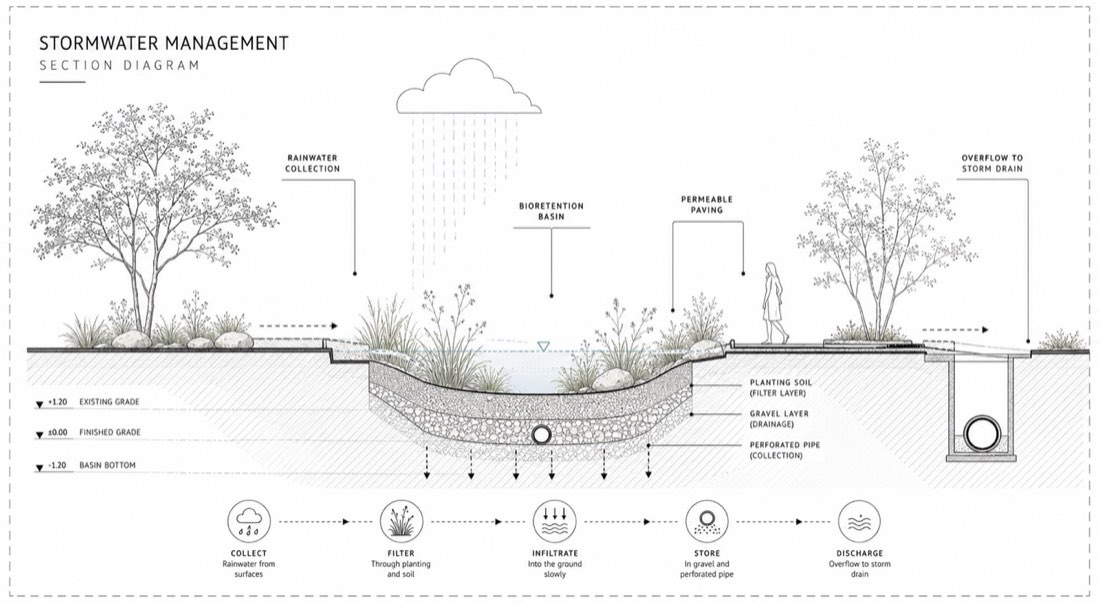
Create a minimal landscape architecture section diagram showing a stormwater management strategy. (Place functions here) STYLE: - ultra-clean architectural section drawing - monochrome editorial presentation - technical landscape architecture graphic - highly restrained and minimal COMPOSITION: - long horizontal section composition - large white background with generous negative space - centered clean layout - subtle dashed border frame around drawing GRAPHIC REPRESENTATION: - precise vector linework - thin grey outlines - soft monochrome hatching for cut/fill areas - minimal detail and highly controlled hierarchy LANDSCAPE ELEMENTS: - delicate vector trees on both sides - minimal groundcover silhouettes - one small architectural human figure for scale - sparse and elegant planting representation TYPOGRAPHY: - clean sans-serif labels - small uppercase annotation boxes - subtle grey text - refined architectural publication aesthetic ANNOTATIONS: INCLUDE LABELS IN CAD STYLE: COLOR PALETTE: - white background - pale grey linework - soft grey hatch patterns - very light vegetation tones VISUAL STYLE: - architectural CAD + Illustrator aesthetic - no rendering - no shadows - no gradients - flat vector drawing only ATMOSPHERE: - calm - analytical - contemporary landscape publication style - elegant technical communication IMPORTANT: - maintain extremely clean spacing - prioritize graphic hierarchy and readability - use thin vector linework only - avoid clutter and excessive texture - make it feel like a professional landscape architecture construction presentation rather than an AI illustration ANTI-AI STYLE CONTROL: - keep all graphics flat and vector-based - avoid sketchy AI linework - avoid photorealistic textures - avoid exaggerated terrain forms - maintain consistent line weights throughout
制作一张极简的景观设计剖面分析图,展示雨水管理策略。(在此填写功能) 风格:- 极其干净的建筑剖面图- 单色杂志式呈现- 技术性的景观设计图示- 高度克制、极简 构图:- 横向长条剖面构图- 大面积白色背景,留白充足- 居中、干净的版式- 图纸外围加一圈淡淡的虚线边框 图示表现:- 精确的矢量线条- 细灰色轮廓- 用柔和的单色排线表示挖方/填方区域- 细节极少,层级高度可控 景观元素:- 两侧精致的矢量树木- 极简的地被剪影- 一个小的建筑式人物表示尺度- 稀疏而优雅的种植表现 字体:- 干净的无衬线标签- 小的全大写标注框- 低调的灰色文字- 精致的建筑出版物美感 标注: 以 CAD 风格加入标签 配色:- 白色背景- 浅灰色线条- 柔和的灰色排线图案- 很浅的植被色调 视觉风格:- 建筑 CAD + Illustrator 美感- 不渲染- 无阴影- 无渐变- 只用扁平矢量图 氛围:- 安静- 理性分析- 当代景观出版物风格- 优雅的技术表达 重要:- 保持极其干净的间距- 优先保证图示层级和可读性- 只用细矢量线条- 避免杂乱和过多纹理- 让它像一份专业的景观施工汇报,而不是 AI 插画 去 AI 感风格控制:- 所有图形保持扁平、基于矢量- 避免潦草的 AI 线条- 避免照片级纹理- 避免夸张的地形- 全图线宽保持一致