AI建筑 AI 提示词库

Vibe Coding 氛围编程 自己做设计小工具。

用 AI 自己做设计小工具,无需编程基础。 建筑概念、景观设计、街道景观。

3 节课4 个案例4 条提示词
Vibe Coding 氛围编程

建筑概念

✦ 提示词生成2 个案例案例 01 · 免费打开课程 →
案例 01免费
建筑概念 – 案例 1: 结果

“Archivision Studio”提示词

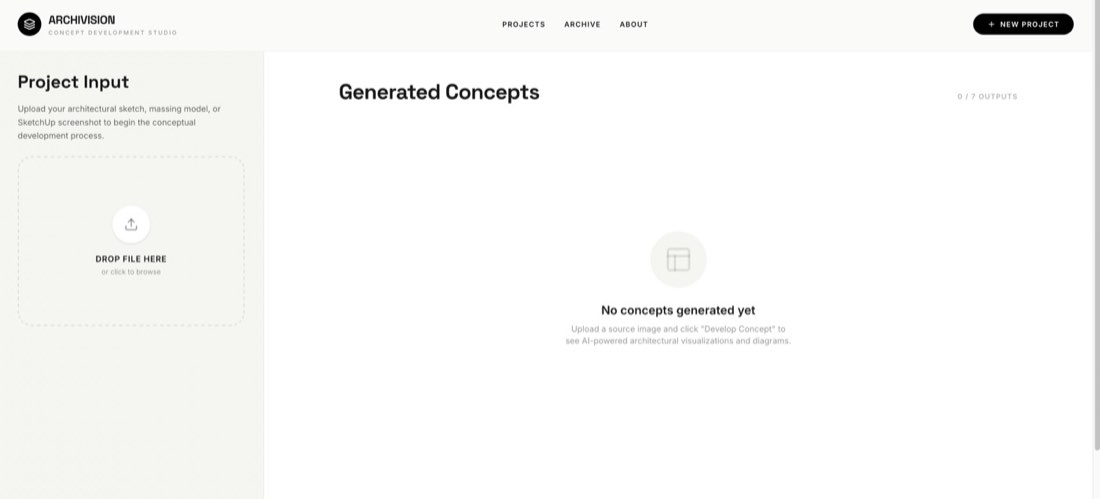
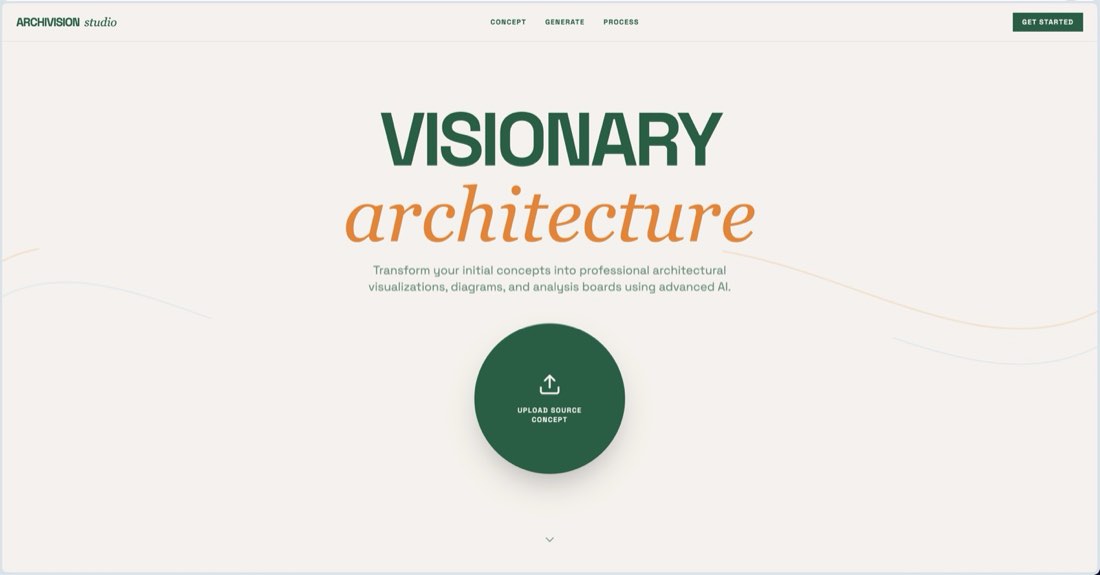
角色:你是一名世界级的资深创意技术专家和建筑设计师。 目标:构建一个名为 Archivision 的高端“建筑概念深化工作室”网页应用。用户(建筑师)上传一张草图或体量模型后,应用会用 AI 自动生成一套 7 张专业分析图和可视化图。 设计美学(配方:温暖有机 / 精致技术): 氛围:亲切、专业、有“手作感”。它应该像一个精品设计工具,而不是千篇一律的 SaaS 产品。 配色:使用暖米白背景(#F5F5F0),主要 UI 元素用纯黑色,主要操作按钮用柔和的橄榄绿(#5A5A40)。 字体:醒目、字距紧凑的展示标题(Inter 或类似字体),搭配干净的小型大写微标签,用于技术元数据。 版式:左右分栏布局。左侧边栏(约 450px)处理项目输入和状态;右侧主区域是宽敞的瀑布流网格,用于展示生成结果。 卡片:使用大圆角(rounded-[2rem])和细微的“卡片阴影”层次。 核心功能: 1. 图片上传:用于建筑草图或截图的拖放区。 2. 顺序生成:点击“Develop Concept(深化概念)”后,应用必须使用 gemini-2.5-flash-image 模型依次触发 7 个具体的 AI 生成任务: • 鸟瞰图:45° 俯视透视。 • 功能分析图:用颜色区分空间功能的 3D 体块。 • 功能爆炸轴测图:竖向分离的功能体量,带流线箭头。 • 城市环境:表现城市融合的单色等轴测分析图。 • 建筑剖面:干净的技术横剖面。 • 楼层分析:带标注的功能竖向分布。 3. 体量分析图:从场地到最终形态的 3×3 演变网格。 进度追踪:实时进度条和状态指示,显示当前正在处理哪张分析图。 4. 容错:实现指数退避重试逻辑,并在任务之间延迟 2 秒,以应对 API 限流(429 RESOURCE_EXHAUSTED)。 技术栈: 前端:React、Tailwind CSS、Lucide-React 图标。 动画:使用 motion/react 为生成的卡片和进度条做流畅的入场动画。 AI 集成:使用 @google/genai SDK。确保图像生成提示词非常详细,分析图要注明“architectural competition style(建筑竞赛风格)”“clean linework(干净线条)”和“no photorealism(非照片级写实)”。

Role: You are a world-class senior creative technologist and architectural designer. Objective: Build a high-end "Architectural Concept Development Studio" web application called Archivision. The app allows architects to upload a single sketch or massing model and automatically generates a suite of 7 professional analytical diagrams and visualizations using AI. Design Aesthetic (Recipe: Warm Organic / Refined Technical): Mood: Approachable, professional, and "crafted." It should feel like a boutique design tool, not a generic SaaS product. Palette: Use a warm off-white background (#F5F5F0), pure black for primary UI elements, and a muted olive-green (#5A5A40) for primary action buttons. Typography: Bold, tight-tracked display headings (Inter or similar) paired with clean, small-caps micro-labels for technical metadata. Layout: A split-pane layout. The left sidebar (approx. 450px) handles project inputs and status; the right main area is a generous, masonry-style grid for the generated results. Cards: Use large rounded corners (rounded-[2rem]) and subtle "card-shadow" depth. CORE FEATURES: 1. Image Upload: A drag-and-drop zone for architectural sketches or screenshots. 2. Sequential Generation: When "Develop Concept" is clicked, the app must sequentially trigger 7 specific AI generation tasks using the gemini-2.5-flash-image model: • Bird's-eye View: 45° top-down perspective. • Program Diagram: Color-coded 3D blocks for spatial functions. • Programmatic Exploded Axonometric: Vertically separated functional volumes with circulation arrows. • Urban Context: Monochrome isometric diagram showing city integration. • Architectural Section: Clean technical cross-section. • Floor Analysis: Vertical distribution of program with annotations. 3. Massing Diagram: A 3×3 evolution grid from site to final form. Progress Tracking: A real-time progress bar and status indicator showing which specific diagram is currently being processed. 4. Resilience: Implement exponential backoff retry logic and a 2-second delay between tasks to handle API rate limits (429 RESOURCE_EXHAUSTED). TECHNICAL STACK: Frontend: React, Tailwind CSS, Lucide-React icons. Animation: Use motion/react for smooth entrance animations of the generated cards and progress bars. AI Integration: Use the @google/genai SDK. Ensure image generation prompts are highly detailed, specifying "architectural competition style," "clean linework," and "no photorealism" for diagrams.
Vibe Coding 氛围编程

景观设计

✦ 提示词生成1 个案例案例 01 · 免费打开课程 →
案例 01免费
景观设计 – 案例 1: 结果

提示词

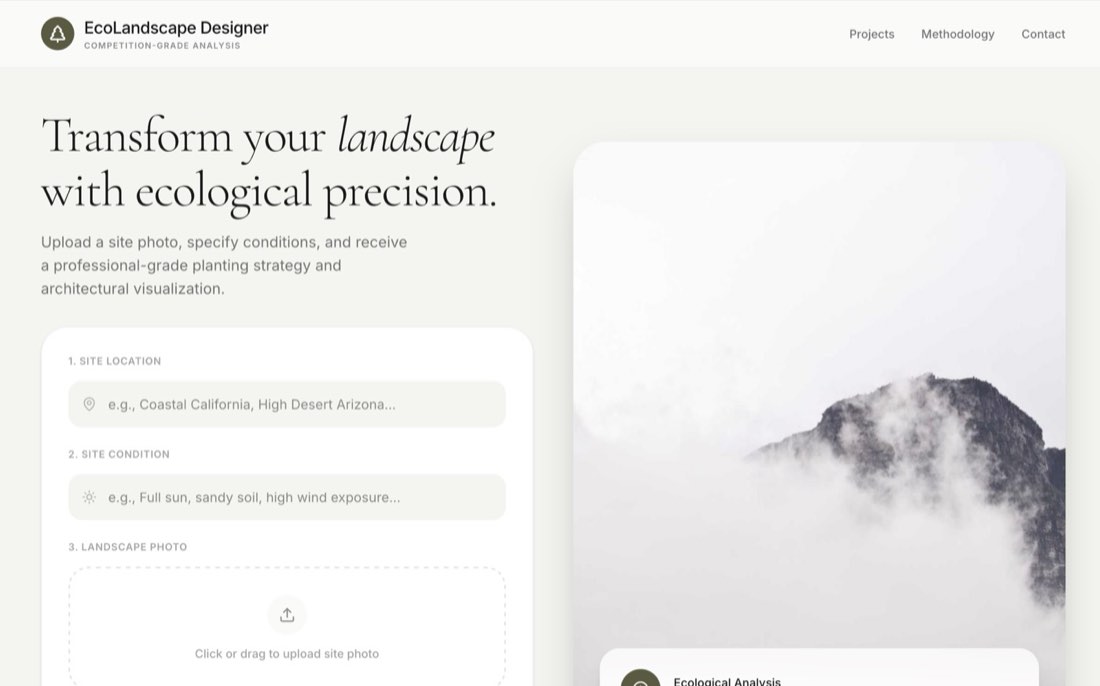
构建一个名为“EcoLandscape Designer”的专业景观设计应用。 核心功能: 场地分析输入:创建一个首页,让用户上传场地照片,并通过“Location(地点)”和“Site Condition(场地条件)”提供背景信息(如“加州沿海”“全日照、沙质土壤”)。 生态智能:使用 Gemini 3.1 Pro 分析上传的图片和文字输入。它应返回一个 JSON 对象,包含: 6–8 种生态上适宜的本土植物清单,分为“Canopy(乔木层)”“Understory(下木层)”和“Groundcover(地被层)”。 一个“Design Concept(设计概念)”和详细的“Arrangement Description(布置说明)”。 植物情绪板:为每种推荐植物,使用 Gemini 2.5 Flash Image 生成一张它在自然生境中的专业植物摄影。 设计效果图:使用 Gemini 2.5 Flash Image 生成一张“Proposed Design(设计方案)”可视化图。它必须完全保留原照片中的建筑和背景,但按照布置逻辑把推荐的具体物种“种”进场景中。 建筑剖面图:使用 Gemini 2.5 Flash Image 生成一张竞赛风格的“照片拼贴混合”剖面图。 剖面必须与原照片的空间环境和地形一致。 剖切线穿过泳池最长的部分。 竖向标注植被层次,加入淡淡的人物剪影表示尺度。 用细引线向上连接到剖面上方大而醒目的圆形物种标注。 错误处理:为所有 Gemini API 调用实现指数退避重试逻辑,以妥善处理 429 RESOURCE_EXHAUSTED(配额)错误。 设计与美学(温暖有机): 氛围:亲切、精致、有人情味。 字体:标题用优雅的衬线字体“Cormorant Garamond”,UI 文字用干净的“Inter”。 配色:使用橄榄绿(#5A5A40)、米色(#F5F5F0)和米白等大地色。 UI 样式:使用大圆角(32px)、胶囊形图片容器和细微阴影。 交互:用“motion”做流畅的入场动画,用“lucide-react”保持图标风格统一。

"Build a professional landscape architecture application called 'EcoLandscape Designer'. CORE FUNCTIONALITY: Site Analysis Input: Create a landing page that allows users to upload a site photo and provide context via 'Location' and 'Site Condition' (e.g., 'Coastal California', 'Full sun, sandy soil'). Ecological Intelligence: Use Gemini 3.1 Pro to analyze the uploaded image and text inputs. It should return a JSON object containing: A list of 6-8 ecologically suitable native plants categorized into 'Canopy', 'Understory', and 'Groundcover'. A 'Design Concept' and a detailed 'Arrangement Description'. Botanical Moodboard: For every suggested plant, use Gemini 2.5 Flash Image to generate a professional botanical photograph in its natural habitat. Proposed Design Rendering: Use Gemini 2.5 Flash Image to generate a 'Proposed Design' visualization. It must maintain the original photo's architecture and background exactly but 'plant' the specific suggested species into the scene according to the arrangement logic. Architectural Section Cut: Generate a competition-style hybrid photomontage section drawing using Gemini 2.5 Flash Image. The section must match the spatial context and topography of the original photo. Include a sectional cut through the longest part of a pool. Feature vertical labeling of vegetation layers and subtle human silhouettes for scale. Use thin guide lines rising to LARGE, PROMINENT circular species callouts above the section. Error Handling: Implement exponential backoff retry logic for all Gemini API calls to handle 429 RESOURCE_EXHAUSTED (quota) errors gracefully. DESIGN & AESTHETIC (WARM ORGANIC): MOOD: APPROACHABLE, REFINED, AND HUMAN.: Typography: Use 'Cormorant Garamond' for elegant serif headings and 'Inter' for clean UI text. Palette: Use earth tones like Olive (#5A5A40), Cream (#F5F5F0), and Off-White. UI Patterns: Use large rounded corners (32px), pill-shaped image containers, and subtle shadows. Interactions: Use 'motion' for smooth entrance animations and 'lucide-react' for consistent iconography.

Vibe Coding 氛围编程

街道景观

✦ 提示词生成1 个案例案例 01 · 免费打开课程 →
案例 01免费
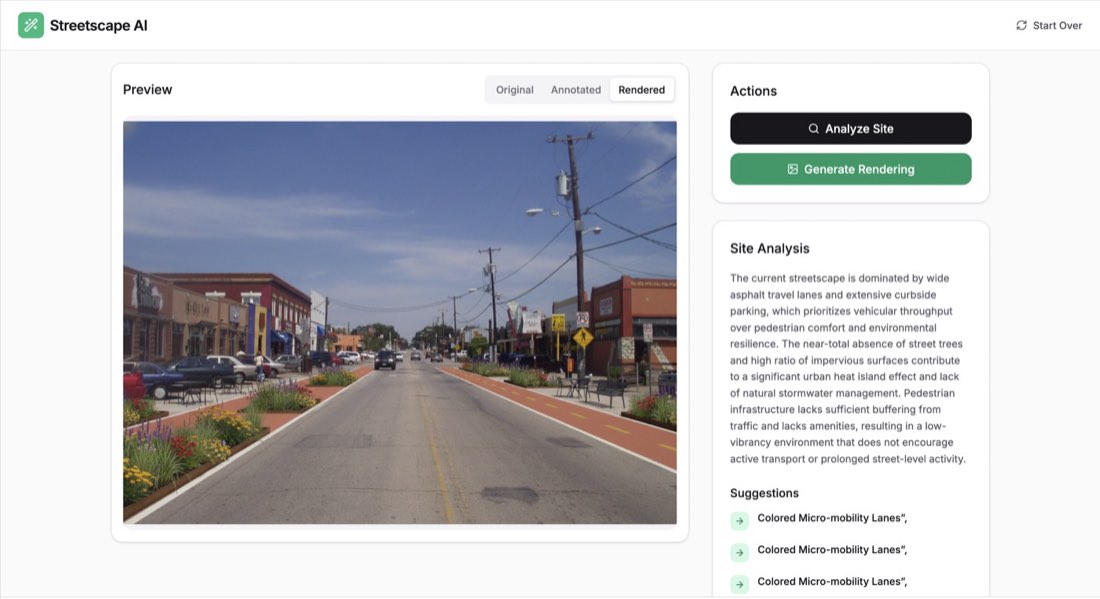
街道景观 – 案例 1: 提示词提示词

提示词

使用 React、Tailwind CSS 和 Gemini API,构建一个专业的街道景观设计与分析网页应用。 核心功能: 图片上传:创建一个干净的拖放区(并提供点击上传作为备选),供用户上传高分辨率街道照片。 AI 场地分析:使用 gemini-3-flash-preview 分析照片。AI 应识别可改进的城市区域,并返回一个 JSON 对象,包含: 对街道现状表现的总体文字分析。 具体建议清单(如“Add Bioswale 增加生态草沟”“Install Bike Lane 设置自行车道”)。 边界框标注:这些改进应放置位置的坐标(0–1000)。 交互式画布叠加:实现一个覆盖在原照片上的 HTML Canvas。把 AI 提供的标注画成白色虚线边界框,配黑色背景的小标签(如“Proposed Bike Lane 拟建自行车道”)。 AI 渲染(图生图):使用 gemini-2.5-flash-image 生成改造方案。图像生成的提示词必须严格做到: 保持与原图完全相同的建筑、建筑形态和街道宽度。 渲染具体的方案元素:彩色自行车道(绿色/陶土色)、现代户外家具,以及低影响种植/生态草沟。 确保透视和光线一致。 视图切换:提供一个分段控件,在三种模式之间切换:Original(原图)、Annotated(标注画布叠加)和 Rendered(AI 生成图)。 设计与体验: 美感:采用“Clean Utility(干净实用)”或“Technical Dashboard(技术仪表盘)”风格。使用 Inter 字体,白色/锌灰配色,Emerald-600 作为主要操作色。 版式:带应用名称“Streetscape AI”的固定顶栏,中央大幅图片预览区,以及用于“Actions(操作)”和“Site Analysis(场地分析)”结果的侧边栏。 反馈:为“Analyzing(分析中)”和“Rendering(渲染中)”过程加入加载状态(加载动画)。 图标:所有 UI 图标使用 lucide-react(Wand2、Search、Image、RefreshCw)。

"Build a professional Streetscape Design & Analysis web application using React, Tailwind CSS, and the Gemini API. CORE FUNCTIONALITY: Image Upload: Create a clean drag-and-drop area (with a fallback click-to-upload) for users to upload a high-resolution street photo. AI Site Analysis: Use gemini-3-flash-preview to analyze the photo. The AI should identify areas for urban improvement and return a JSON object containing: A general text analysis of the street's current performance. A list of specific suggestions (e.g., 'Add Bioswale', 'Install Bike Lane'). Bounding Box Annotations: Coordinates (0-1000) for where these improvements should be placed. Interactive Canvas Overlay: Implement an HTML Canvas that overlays the original photo. Draw the AI-provided annotations as white dashed bounding boxes with small black-background labels (e.g., 'Proposed Bike Lane'). AI Rendering (Image-to-Image): Use gemini-2.5-flash-image to generate a redesign. The prompt for the image generation must strictly: Maintain the exact same buildings, architecture, and street width as the original. Render specific proposal elements: colored bike lanes (green/terracotta), modern outdoor furniture, and low-impact planting/bioswales. Ensure consistent perspective and lighting. View Toggler: Provide a segmented control to switch between three modes: Original, Annotated (Canvas overlay), and Rendered (AI-generated image). DESIGN & UX: Aesthetic: Use a 'Clean Utility' or 'Technical Dashboard' style. Use the Inter font, a white/zinc color palette with Emerald-600 as the primary action color. Layout: A sticky header with the app name 'Streetscape AI', a large central image preview area, and a sidebar for 'Actions' and 'Site Analysis' results. Feedback: Include loading states (spinners) for the 'Analyzing' and 'Rendering' processes. Icons: Use lucide-react for all UI icons (Wand2, Search, Image, RefreshCw).

获取提示词库全部内容

218 条实测提示词、210 个案例、423 张前后对比图,适用于 Nano Banana 和 ChatGPT,附 291 页中英双语 PDF。

获取完整提示词库

登录 AI for Architecture

登录后即可订阅会员,并在任何设备上解锁全部提示词。

或