 提示词
提示词
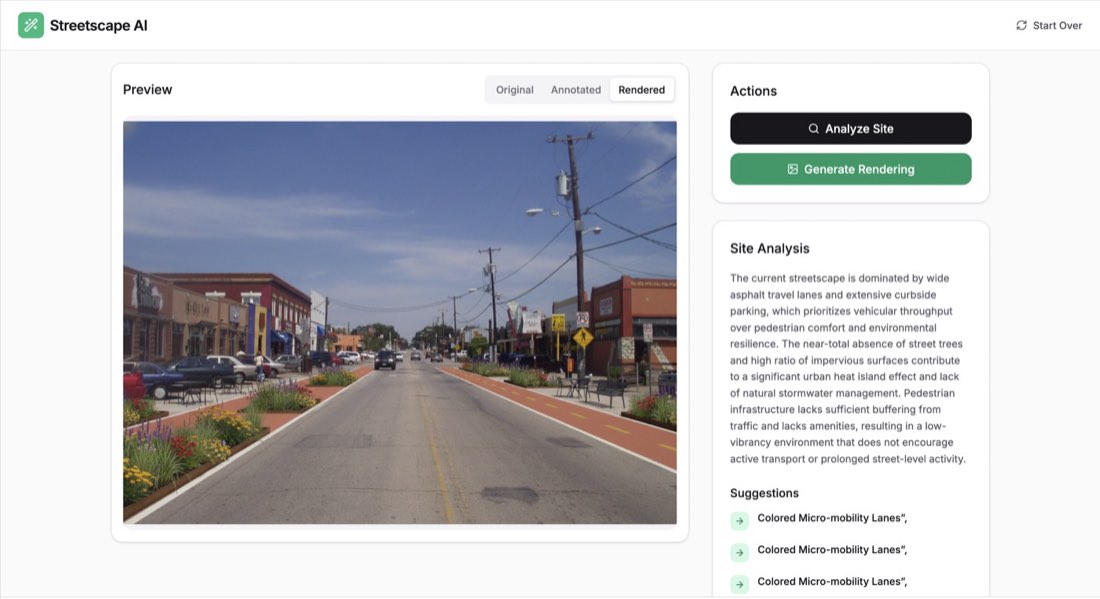
"Build a professional Streetscape Design & Analysis web application using React, Tailwind CSS, and the Gemini API. CORE FUNCTIONALITY: Image Upload: Create a clean drag-and-drop area (with a fallback click-to-upload) for users to upload a high-resolution street photo. AI Site Analysis: Use gemini-3-flash-preview to analyze the photo. The AI should identify areas for urban improvement and return a JSON object containing: A general text analysis of the street's current performance. A list of specific suggestions (e.g., 'Add Bioswale', 'Install Bike Lane'). Bounding Box Annotations: Coordinates (0-1000) for where these improvements should be placed. Interactive Canvas Overlay: Implement an HTML Canvas that overlays the original photo. Draw the AI-provided annotations as white dashed bounding boxes with small black-background labels (e.g., 'Proposed Bike Lane'). AI Rendering (Image-to-Image): Use gemini-2.5-flash-image to generate a redesign. The prompt for the image generation must strictly: Maintain the exact same buildings, architecture, and street width as the original. Render specific proposal elements: colored bike lanes (green/terracotta), modern outdoor furniture, and low-impact planting/bioswales. Ensure consistent perspective and lighting. View Toggler: Provide a segmented control to switch between three modes: Original, Annotated (Canvas overlay), and Rendered (AI-generated image). DESIGN & UX: Aesthetic: Use a 'Clean Utility' or 'Technical Dashboard' style. Use the Inter font, a white/zinc color palette with Emerald-600 as the primary action color. Layout: A sticky header with the app name 'Streetscape AI', a large central image preview area, and a sidebar for 'Actions' and 'Site Analysis' results. Feedback: Include loading states (spinners) for the 'Analyzing' and 'Rendering' processes. Icons: Use lucide-react for all UI icons (Wand2, Search, Image, RefreshCw).