The Prompt
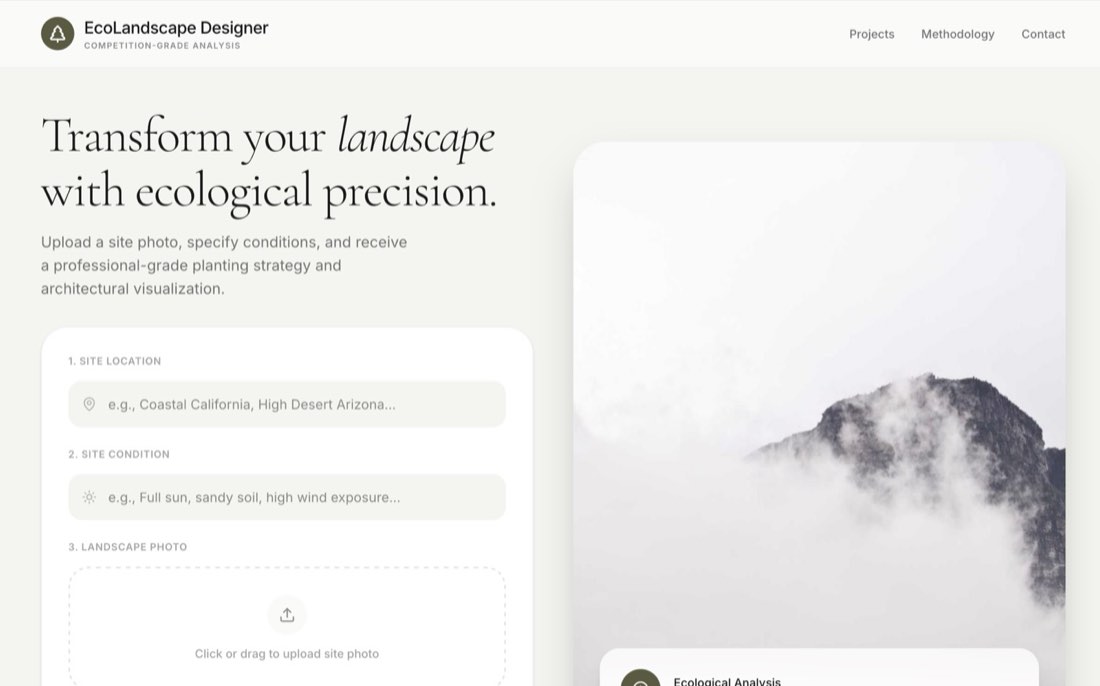
"Build a professional landscape architecture application called 'EcoLandscape Designer'. CORE FUNCTIONALITY: Site Analysis Input: Create a landing page that allows users to upload a site photo and provide context via 'Location' and 'Site Condition' (e.g., 'Coastal California', 'Full sun, sandy soil'). Ecological Intelligence: Use Gemini 3.1 Pro to analyze the uploaded image and text inputs. It should return a JSON object containing: A list of 6-8 ecologically suitable native plants categorized into 'Canopy', 'Understory', and 'Groundcover'. A 'Design Concept' and a detailed 'Arrangement Description'. Botanical Moodboard: For every suggested plant, use Gemini 2.5 Flash Image to generate a professional botanical photograph in its natural habitat. Proposed Design Rendering: Use Gemini 2.5 Flash Image to generate a 'Proposed Design' visualization. It must maintain the original photo's architecture and background exactly but 'plant' the specific suggested species into the scene according to the arrangement logic. Architectural Section Cut: Generate a competition-style hybrid photomontage section drawing using Gemini 2.5 Flash Image. The section must match the spatial context and topography of the original photo. Include a sectional cut through the longest part of a pool. Feature vertical labeling of vegetation layers and subtle human silhouettes for scale. Use thin guide lines rising to LARGE, PROMINENT circular species callouts above the section. Error Handling: Implement exponential backoff retry logic for all Gemini API calls to handle 429 RESOURCE_EXHAUSTED (quota) errors gracefully. DESIGN & AESTHETIC (WARM ORGANIC): MOOD: APPROACHABLE, REFINED, AND HUMAN.: Typography: Use 'Cormorant Garamond' for elegant serif headings and 'Inter' for clean UI text. Palette: Use earth tones like Olive (#5A5A40), Cream (#F5F5F0), and Off-White. UI Patterns: Use large rounded corners (32px), pill-shaped image containers, and subtle shadows. Interactions: Use 'motion' for smooth entrance animations and 'lucide-react' for consistent iconography.
构建一个名为“EcoLandscape Designer”的专业景观设计应用。 核心功能: 场地分析输入:创建一个首页,让用户上传场地照片,并通过“Location(地点)”和“Site Condition(场地条件)”提供背景信息(如“加州沿海”“全日照、沙质土壤”)。 生态智能:使用 Gemini 3.1 Pro 分析上传的图片和文字输入。它应返回一个 JSON 对象,包含: 6–8 种生态上适宜的本土植物清单,分为“Canopy(乔木层)”“Understory(下木层)”和“Groundcover(地被层)”。 一个“Design Concept(设计概念)”和详细的“Arrangement Description(布置说明)”。 植物情绪板:为每种推荐植物,使用 Gemini 2.5 Flash Image 生成一张它在自然生境中的专业植物摄影。 设计效果图:使用 Gemini 2.5 Flash Image 生成一张“Proposed Design(设计方案)”可视化图。它必须完全保留原照片中的建筑和背景,但按照布置逻辑把推荐的具体物种“种”进场景中。 建筑剖面图:使用 Gemini 2.5 Flash Image 生成一张竞赛风格的“照片拼贴混合”剖面图。 剖面必须与原照片的空间环境和地形一致。 剖切线穿过泳池最长的部分。 竖向标注植被层次,加入淡淡的人物剪影表示尺度。 用细引线向上连接到剖面上方大而醒目的圆形物种标注。 错误处理:为所有 Gemini API 调用实现指数退避重试逻辑,以妥善处理 429 RESOURCE_EXHAUSTED(配额)错误。 设计与美学(温暖有机): 氛围:亲切、精致、有人情味。 字体:标题用优雅的衬线字体“Cormorant Garamond”,UI 文字用干净的“Inter”。 配色:使用橄榄绿(#5A5A40)、米色(#F5F5F0)和米白等大地色。 UI 样式:使用大圆角(32px)、胶囊形图片容器和细微阴影。 交互:用“motion”做流畅的入场动画,用“lucide-react”保持图标风格统一。