 The Prompt
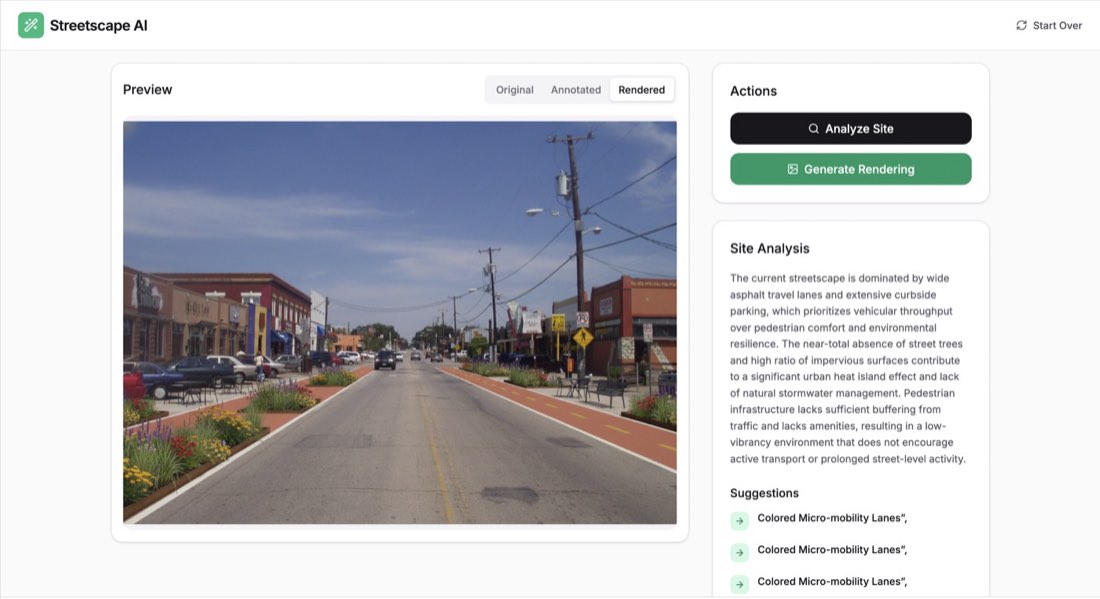
"Build a professional Streetscape Design & Analysis web application using React, Tailwind CSS, and the Gemini API. CORE FUNCTIONALITY: Image Upload: Create a clean drag-and-drop area (with a fallback click-to-upload) for users to upload a high-resolution street photo. AI Site Analysis: Use gemini-3-flash-preview to analyze the photo. The AI should identify areas for urban improvement and return a JSON object containing: A general text analysis of the street's current performance. A list of specific suggestions (e.g., 'Add Bioswale', 'Install Bike Lane'). Bounding Box Annotations: Coordinates (0-1000) for where these improvements should be placed. Interactive Canvas Overlay: Implement an HTML Canvas that overlays the original photo. Draw the AI-provided annotations as white dashed bounding boxes with small black-background labels (e.g., 'Proposed Bike Lane'). AI Rendering (Image-to-Image): Use gemini-2.5-flash-image to generate a redesign. The prompt for the image generation must strictly: Maintain the exact same buildings, architecture, and street width as the original. Render specific proposal elements: colored bike lanes (green/terracotta), modern outdoor furniture, and low-impact planting/bioswales. Ensure consistent perspective and lighting. View Toggler: Provide a segmented control to switch between three modes: Original, Annotated (Canvas overlay), and Rendered (AI-generated image). DESIGN & UX: Aesthetic: Use a 'Clean Utility' or 'Technical Dashboard' style. Use the Inter font, a white/zinc color palette with Emerald-600 as the primary action color. Layout: A sticky header with the app name 'Streetscape AI', a large central image preview area, and a sidebar for 'Actions' and 'Site Analysis' results. Feedback: Include loading states (spinners) for the 'Analyzing' and 'Rendering' processes. Icons: Use lucide-react for all UI icons (Wand2, Search, Image, RefreshCw).
使用 React、Tailwind CSS 和 Gemini API,构建一个专业的街道景观设计与分析网页应用。 核心功能: 图片上传:创建一个干净的拖放区(并提供点击上传作为备选),供用户上传高分辨率街道照片。 AI 场地分析:使用 gemini-3-flash-preview 分析照片。AI 应识别可改进的城市区域,并返回一个 JSON 对象,包含: 对街道现状表现的总体文字分析。 具体建议清单(如“Add Bioswale 增加生态草沟”“Install Bike Lane 设置自行车道”)。 边界框标注:这些改进应放置位置的坐标(0–1000)。 交互式画布叠加:实现一个覆盖在原照片上的 HTML Canvas。把 AI 提供的标注画成白色虚线边界框,配黑色背景的小标签(如“Proposed Bike Lane 拟建自行车道”)。 AI 渲染(图生图):使用 gemini-2.5-flash-image 生成改造方案。图像生成的提示词必须严格做到: 保持与原图完全相同的建筑、建筑形态和街道宽度。 渲染具体的方案元素:彩色自行车道(绿色/陶土色)、现代户外家具,以及低影响种植/生态草沟。 确保透视和光线一致。 视图切换:提供一个分段控件,在三种模式之间切换:Original(原图)、Annotated(标注画布叠加)和 Rendered(AI 生成图)。 设计与体验: 美感:采用“Clean Utility(干净实用)”或“Technical Dashboard(技术仪表盘)”风格。使用 Inter 字体,白色/锌灰配色,Emerald-600 作为主要操作色。 版式:带应用名称“Streetscape AI”的固定顶栏,中央大幅图片预览区,以及用于“Actions(操作)”和“Site Analysis(场地分析)”结果的侧边栏。 反馈:为“Analyzing(分析中)”和“Rendering(渲染中)”过程加入加载状态(加载动画)。 图标:所有 UI 图标使用 lucide-react(Wand2、Search、Image、RefreshCw)。