 Nano Banana
 → ChatGPT
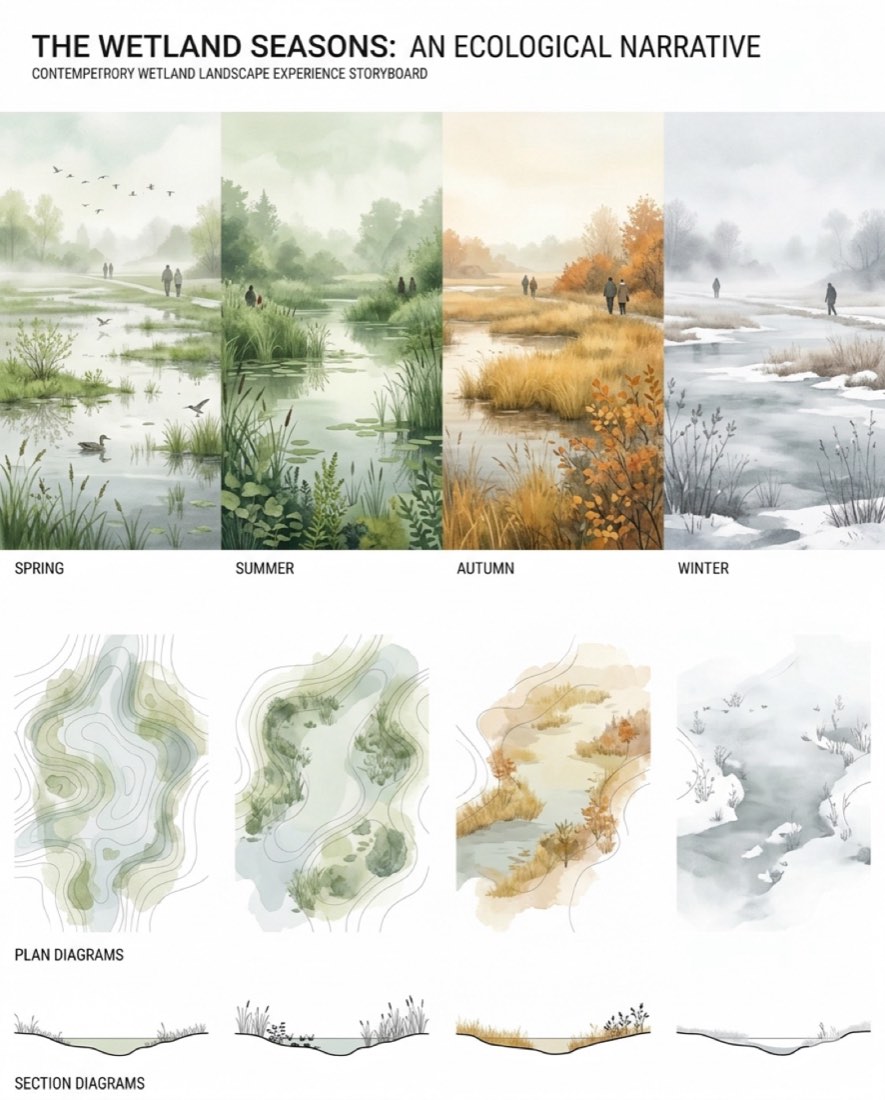
制作一张当代滨水城市公园的景观体验故事板,展示同一片湿地景观在四季中的变化。 画幅比例:4:5 竖向构图。 风格: - 景观设计叙事展板 - 生态叙事拼贴 - 有氛围的杂志式图示 - 极简而有电影感 - 当代竞赛汇报风格 版式: - 四个相连的季节景观画面横向排列 - 每个画面代表: 1. 春季湿地 2. 夏季湿地 3. 秋季湿地 4. 冬季湿地 - 底行为对应的极简矢量生态分析图和剖面 - 大面积白色边距和留白 ──────────────────────── 上行 —— 四季湿地氛围 ──────────────────────── 春季: - 浅浅淹水的湿地 - 新绿的植被萌发 - 柔和的薄雾和倒影水面 - 候鸟和湿地草本 夏季: - 茂密葱郁的湿地种植 - 平静如镜的水池 - 高大的芦苇和水生植被 - 湿润的空气和丰富的生态生长 秋季: - 金色的湿地草本 - 橙色和棕色的落叶植被 - 水位较低 - 柔和温暖的光线和季节过渡 冬季: - 冰封或部分冰封的湿地 - 淡色的植被剪影 - 零星积雪和薄雾 - 安静有氛围的景观 视觉风格: - 柔和的照片拼贴 - 半透明的分层图像 - 季节之间有氛围地融合过渡 - 柔和的自然色彩 - 水彩-矢量混合的效果 景观元素: - 湿地水塘 - 芦苇 - 沼泽草本 - 柔和的土丘 - 浅水沟渠 - 本土湿地乔木和灌木 人物: - 在景观中行走的淡淡小人 - 自然融入场景 - 安静、有氛围 重要: - 无雕塑 - 无人工装置物 - 完全聚焦于自然湿地生态和季节氛围 ──────────────────────── 下行 —— 极简矢量分析图 ──────────────────────── 在每个季节场景正下方制作高度极简的生态分析图。 平面分析图风格: - 扁平矢量图形 - 细而精确的线条 - 浅灰色等高线 - 柔和绿色的半透明湿地分区 - 简单的圆形树木符号 - 抽象的生态制图 - 极简的地形图案 - 无渲染、无纹理 剖面分析图风格: - 极其干净的矢量景观剖面 - 细的黑色或灰色线条 - 简化的湿地地形轮廓 - 极简的植被剪影 - 只用扁平的图形表现 图示语言: - 建筑式 Illustrator 矢量分析图 - 克制而优雅 - 高度简化的几何 - 无阴影 - 无渐变 - 不写实 - 无草图质感 配色: - 柔和的鼠尾草绿 - 浅橄榄绿 - 褪色的米灰 - 柔和的冬季灰 - 克制的秋季金色点缀 - 饱和度很低 矢量风格控制: - 分析图应有理性分析和杂志感 - 干净的 CAD + Illustrator 美感 - 大量留白 - 避免装饰性的复杂 - 只用细微的透明度 ──────────────────────── 整体图示风格 ──────────────────────── - 杂志级的景观设计出版物品质 - 高度克制、有氛围 - 生态信息设计 - 安静、极简 - 当代展览展板美感 渲染: - 只用柔和的环境光 - 无生硬阴影 - 无光泽渲染 - 避免照片级细节 重要: - 优先表现氛围和生态叙事 - 保持强烈的图示层级 - 使用柔和的分层透明度 - 避免视觉杂乱 - 构图保持通透、极简 - 让它像一张精心策划的生态展览展板,而不是 AI 渲染图 去 AI 感风格控制: - 用半透明拼贴分层代替写实渲染 - 柔化季节场景之间的过渡 - 保留大面积留白 - 避免过饱和的植被 - 避免过多细节和视觉噪点 - 底部分析图保持扁平、基于矢量、极其干净
Create a contemporary waterfront urban park landscape experience storyboard showing the transformation of the same wetland landscape across the four seasons. ASPECT RATIO: 4:5 VERTICAL COMPOSITION.: STYLE: - landscape architecture narrative board - ecological storytelling collage - atmospheric editorial graphic - minimal and cinematic - contemporary competition presentation style LAYOUT: - four connected seasonal landscape panels arranged horizontally - each panel represents: 1. spring wetland 2. summer wetland 3. autumn wetland 4. winter wetland - bottom row contains corresponding minimal vector ecological diagrams and sections - large white margins and negative space ──────────────────────── TOP ROW — SEASONAL WETLAND ATMOSPHERES ──────────────────────── SPRING: - shallow flooded wetland - fresh green vegetation emerging - soft mist and reflective water - migratory birds and wetland grasses SUMMER: - lush dense wetland planting - calm reflective pools - tall reeds and aquatic vegetation - humid atmosphere and rich ecological growth AUTUMN: - golden wetland grasses - orange and brown deciduous vegetation - lower water level - soft warm light and seasonal transition WINTER: - frozen or partially frozen wetland - pale vegetation silhouettes - snow patches and mist - quiet atmospheric landscape VISUAL STYLE: - soft photomontage collage - semi-transparent layered imagery - atmospheric blending between seasons - muted natural colors - watercolor-vector hybrid appearance LANDSCAPE ELEMENTS: - wetland pools - reeds - marsh grasses - soft terrain mounds - shallow water channels - native wetland trees and shrubs HUMAN FIGURES: - subtle small figures walking through landscape - integrated naturally into scenes - quiet and atmospheric IMPORTANT: - no sculptures - no artificial installation objects - focus entirely on natural wetland ecology and seasonal atmosphere ──────────────────────── BOTTOM ROW — MINIMAL VECTOR DIAGRAMS ──────────────────────── Create highly minimal ecological diagrams directly beneath each seasonal scene. PLAN DIAGRAM STYLE: - flat vector graphics - thin precise linework - pale grey contour lines - soft green transparent wetland zones - simple circular tree symbols - abstract ecological mapping - minimal topographic patterns - no rendering or texture SECTION DIAGRAM STYLE: - ultra-clean vector landscape sections - thin black or grey linework - simplified wetland terrain profiles - minimal vegetation silhouettes - flat graphic representation only GRAPHIC LANGUAGE: - architectural Illustrator-style vector diagrams - restrained and elegant - highly simplified geometry - no shadows - no gradients - no realism - no sketch texture COLOR PALETTE: - muted sage green - pale olive - faded beige-grey - soft winter grey - restrained autumn gold accents - very low saturation VECTOR STYLE CONTROL: - diagrams should feel analytical and editorial - clean CAD + Illustrator aesthetic - lots of white space - avoid decorative complexity - use subtle transparency only ──────────────────────── OVERALL GRAPHIC STYLE ──────────────────────── - editorial landscape architecture publication quality - highly restrained and atmospheric - ecological information design - calm and minimal - contemporary exhibition panel aesthetic RENDERING: - soft ambient lighting only - no hard shadows - no glossy rendering - avoid photorealistic detail IMPORTANT: - prioritize atmosphere and ecological storytelling - maintain strong graphic hierarchy - use soft layered transparency - avoid visual clutter - keep the composition airy and minimal - make it feel like a curated ecological exhibition panel rather than an AI rendering ANTI-AI STYLE CONTROL: - use semi-transparent collage layering instead of realistic rendering - soften transitions between seasonal scenes - maintain large areas of negative space - avoid oversaturated vegetation - avoid excessive detail and visual noise - keep bottom diagrams flat, vector-based, and extremely clean